Festival Runner help
How to track your festival submissions, from first deadline to last laurel.
Getting started
Open festivalrunner.com. The first screen offers two ways in:
- Sign in with Google: your projects are saved in your own Google Drive and stay the same on your computer, phone and tablet.
- Use without an account: everything stays on this one device. You can sign in later from Settings, and what you've entered comes with you.
Festival Runner works offline either way. Changes save on the device first and sync when you're back online.
Install it on your devices
Installing puts Festival Runner on your home screen or dock like any other app, and lets it open without a connection.
- iPhone or iPad (Safari): tap the Share button, then Add to Home Screen.
- Android (Chrome): tap the ⋮ menu, then Install app (or Add to Home screen).
- Mac or Windows (Chrome or Edge): click the install icon at the right end of the address bar.
- Mac (Safari): choose File → Add to Dock.
Projects
A project is one film you're sending to festivals. It holds that film's festivals, screenings and laurels. After you sign in (or skip), the Projects screen lets you:
- Create a project with the film's title, year and home country. The home country is used to check international premiere rules.
- Import from a spreadsheet to start a project from your existing festival sheet (see Importing a spreadsheet).
- Open a project by clicking it, or pick All projects to see every film together.
Switch projects any time from Tracking in the top bar, or click Projects to go back to the list. Rename projects from Rename or edit projects on the Projects screen.
Adding festivals
Click + Add festival on the Festivals tab. Only the name is required. Fill in what you know: location, deadline, entry fee, category, the festival's dates, when it notifies, its premiere requirement and its tier (your own 1–3 ranking).
If the festival is on FilmFreeway, the FilmFreeway bookmark fills most of this in for you.
New festivals start on your Watchlist: ones you're considering. The Overview tab counts down their deadlines so nothing sneaks past.
Importing a spreadsheet
If you already track festivals in a Google Sheet:
- In Google Sheets, click Share and set General access to Anyone with the link → Viewer. The sheet can live anywhere in your Drive.
- Copy the sheet's link.
- In Festival Runner, use Import from a spreadsheet on the Projects screen (for a new project) or in Settings (into an existing one). Paste the link.
- Type the tab names exactly as they appear at the bottom of your sheet, for example Festivals. A second tab of selections is optional.
Column names are matched loosely, and messy dates and combined status text like "WAIVER, SELECTED, NOMINATED" are understood. You can also import CSV files: in Google Sheets choose File → Download → Comma-separated values, once per tab.
Submissions and decisions
- Mark submitted when you enter a festival. Confirm the fee you actually paid (or tick Fee was waived) and the category. It moves to Waiting, and the fee is added to your spending.
- When you hear back, one tap: Selected, Rejected, or Recognized for a quarter-finalist, semi-finalist, finalist or honorable mention without a screening.
- Made a mistake? The message at the bottom of the screen has an Undo button.
The Overview shows what you've spent against your budget, your acceptance rate (selected ÷ selected + rejected), what's coming up and what you're waiting to hear. The Premiere check warns when a festival's premiere requirement clashes with where the film has already screened.
Screenings, awards and laurels
- Open a selected festival to add the screening date and time, whether you're attending, and travel costs. The Screenings tab lists them by date.
- Under Awards, add each nomination or win: who gave it, what it was for, and the festival's own name for it if there is one.
- On the Laurels tab or in the festival's editor, upload each laurel image as it arrives. Transparent PNGs look best. Files named like "winner" or "nominee" are sorted for you, and missing laurels are flagged.
The FilmFreeway bookmark
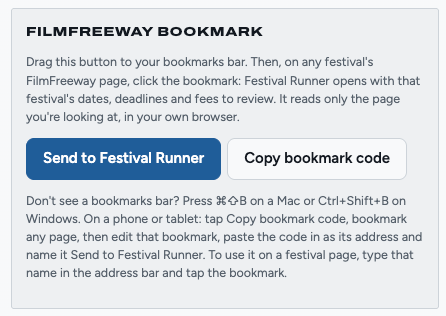
The Send to Festival Runner bookmark reads a festival's page on FilmFreeway and brings its dates, deadlines and fees into Festival Runner, so you don't have to copy them by hand.
Set it up on a computer (once)
- Show your browser's bookmarks bar: ⌘ ⇧ B on a Mac, Ctrl Shift B on Windows.
- In Festival Runner, open Settings → FilmFreeway bookmark.
- Drag the blue Send to Festival Runner button up onto the bookmarks bar. (Clicking it in Settings does nothing; it only works from the bookmarks bar.)
Set it up on a phone or tablet
- In Settings → FilmFreeway bookmark, tap Copy bookmark code.
- Bookmark any page in your browser, then edit that bookmark: name it Send to Festival Runner and paste the copied code in as its address.
- To use it, open a festival page on FilmFreeway, type Send to Festival Runner in the address bar, and tap the bookmark when it appears.
Use it
- Open a festival's main page on FilmFreeway, the one with its dates and categories.
- Click Send to Festival Runner on your bookmarks bar.
- Festival Runner opens:
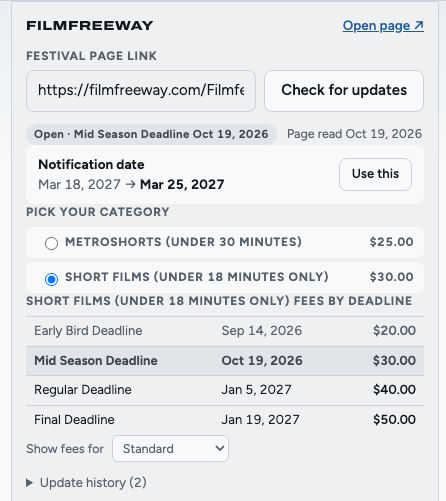
- If the festival is already on your list, it opens with any changes as suggestions, such as "Notification date Mar 18 → Mar 25". Click Use this for each one you want (or Use all), then Save.
- If it's new, the Add festival form opens filled in. Pick your category below the FilmFreeway link to fill in its fee, then Save.
What it does and doesn't do. It reads only the page you're looking at, in your own browser, when you click it. It never visits FilmFreeway on its own and never sends anything to a server. Nothing changes until you click Use this. Once you've submitted, the fee you paid, your category and deadline are locked, so FilmFreeway can't change them.
It says "This doesn't look like a FilmFreeway festival page."
Go to the festival's main page (not its Rules, Reviews or Photos tab) and try again.
I clicked it and nothing opened.
Your browser may have blocked the new tab. Allow pop-ups for filmfreeway.com, or look for a Festival Runner tab that's already open.
It stopped reading pages properly.
FilmFreeway may have redesigned its pages. After the next Festival Runner update, delete the bookmark and drag a fresh one from Settings.
Sync and your devices
- Signed in, your data lives in a Festival Runner folder in your own Google Drive. The app can only see files it created there; nothing else in your Drive.
- Edits save on the device straight away and sync a few seconds later. Opening the app or switching back to it pulls in changes from your other devices.
- Offline? Keep working. Everything syncs when you're back online.
- Google's sign-in lasts about an hour at a time. When it runs out you'll see Reconnect: one click, and your edits from meanwhile go up.
- If you changed the same festival on two devices before they synced, the newer edit wins. The other version is kept in Settings → Sync with Google Drive with a Use this version button, so nothing is lost.
- Your account button in the top bar shows who's signed in, when it last synced, Sync now and Sign out. Signing out keeps your data on the device and in your Drive.
Each person signs in with their own Google account and has their own festivals. Sync keeps your devices the same; it doesn't share data with other people. To share, send someone an exported sheet (below).
Backups and exports
- Download backup (Settings) saves everything, including laurel images, to one file. Do it now and then, especially if you don't sign in. Restore from backup brings it back.
- Export spreadsheet (.csv) saves your festivals as a CSV file for Excel, Numbers or Google Sheets.
- Export to Google Sheet (signed in) creates a new Google Sheet in your Festival Runner folder.
- Erase all data removes everything from this device and signs out. Your Google Drive copy stays.
Troubleshooting
Google shows "500. That's an error."
That's a hiccup on Google's side, usually from a confused sign-in. Quit your browser completely (⌘ Q on a Mac) and reopen it, or try a private window.
I click Sign in with Google and nothing appears.
The Google window may have opened behind your main window (on a Mac, ⌘ ` cycles windows), or your browser blocked it: look for a blocked pop-up icon in the address bar and allow pop-ups for festivalrunner.com.
Importing a sheet says "failed to fetch" or finds nothing.
Check the sheet is shared as Anyone with the link → Viewer, and that the tab names match exactly.
My other device doesn't show my latest changes.
Make sure both devices are signed in to the same Google account and online, then open the account menu and click Sync now. If you see Reconnect, click it first.
The app looks out of date after an update.
Close it and open it again. Installed copies pick up updates on the next launch.
Questions or a bug? hello@festivalrunner.com · Back to Festival Runner · Privacy · Terms